
Many virtual private network (VPN) applications now include various forms of ad-blocking and antimalware features, which can be quite beneficial. However, one common drawback is that users usually lack control over which sites are blocked. Instead, VPN providers maintain their own internal blocklists, and users can simply choose to enable or disable them. If a blocklist prevents access to a necessary resource, users often have no choice but to temporarily disable the entire VPN ad blocker.
Windscribe’s ROBERT, however, operates differently by offering users greater flexibility in deciding what content to block. Rather than a simplistic on/off toggle, ROBERT provides multiple categories of content that can be blocked or allowed. Additionally, users can implement their own custom rules to block or allow any domain they choose. Once these rules are established, ROBERT applies them instantly across the entire Windscribe account.
Explore the details of Windscribe’s innovative ROBERT ad blocker, including its workings and usage tips.
How ROBERT Differs from Standard Ad Blockers

Standard ad blockers operate within the browser, examining webpage elements as they load and either preventing the loading of ad components or removing them entirely from the page. While effective, browser-level ad blockers can consume significant system resources, such as RAM, since they must analyze each tab in the browser upon loading. Furthermore, they are limited to the browser where they are installed, which can be problematic for devices like smart TVs or gaming consoles.
In contrast, Domain Name System (DNS)-level ad blocking addresses ads at the source level. The DNS translates web addresses, like CNET.com, into numerical IP addresses that machines can interpret, such as 199.240.199.200. Instead of waiting for a request to download an ad, a DNS ad blocker stops the internet traffic from requesting that ad in the first place.
When a DNS ad blocker is operational, it doesn’t matter which application on your device makes the request. Whether it’s a browser or an app, the DNS ad blocker works to intercept the request before any ads can be displayed. VPNs typically provide both browser-based and DNS-based ad-blocking solutions; however, users often lack control over which sites are blocked on the DNS side. If a necessary site is on a VPN’s blocklist, users may have to turn off the ad-blocking feature entirely or request the provider to remove the site from its blocklist.
Windscribe’s ROBERT offers significantly greater control by allowing users to block entire categories of websites and customize their own block or unblock lists.
Understanding DNS Blocking

Every website has a numeric IP address (e.g., 199.300.400.500) that is translated into a human-readable format, like CNET.com. This translation is facilitated by the Domain Name System (DNS), which is a global system for converting domain names into IP addresses. When visiting a website, your device sends a DNS request to the nearest resolver to obtain the corresponding IP address.
If the resolver doesn’t have the necessary information, it escalates the request to more authoritative DNS servers until an IP address is found. This system allows users to remember easy domain names instead of complex numerical addresses.
When using Windscribe with ROBERT enabled, DNS requests are routed through the VPN tunnel to Windscribe’s internal DNS servers rather than public ones. These servers also run ROBERT, which checks the requested domain against the enabled blocklists and any custom rules. If a domain matches one on the blocklist, the request is denied, meaning the device cannot find an IP address associated with that domain, effectively dropping the request before it reaches the user’s device, thus preventing malicious domains from accessing the device.
What Does ROBERT Block?
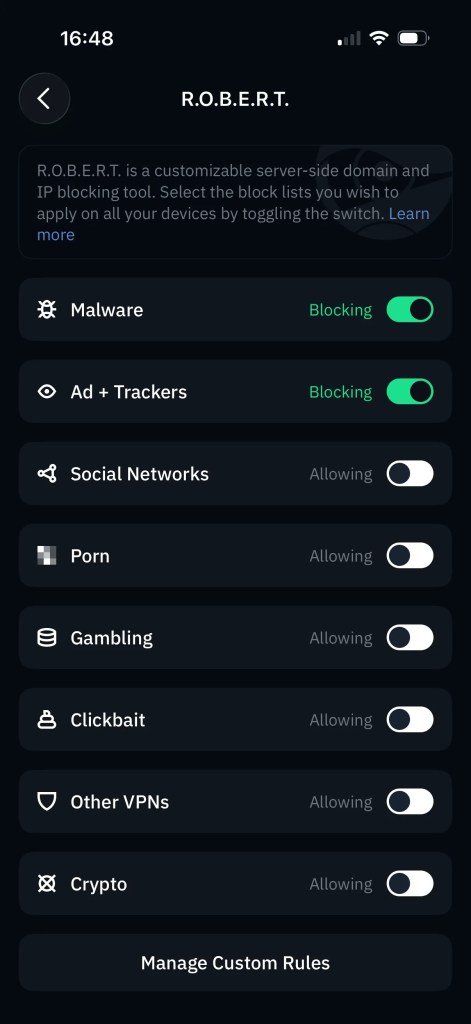
ROBERT automatically blocks ads, trackers, and known malicious domains while also offering optional content categories which can be activated as needed. The tool organizes most of this into pre-made blocklists, combining various community-managed lists with Windscribe’s curated whitelists to minimize false positives.
In addition to the pre-made lists, ROBERT allows users to create their own custom rules:
- Malware: This list targets sites associated with malware distribution, phishing attempts, or botnet command-and-control servers. Unless necessary for research, this list should generally remain enabled.
- Ads and Trackers: Described by Windscribe as one of the most comprehensive lists available, this hand-curated list aims to eliminate common false positives while enhancing loading speed and reducing data usage on mobile devices.
- Social Networks: This category blocks not only social media platforms but also the trackers that follow users across the web. Users can choose to allow a specific network while blocking others, which is useful for maintaining privacy and managing family device usage.
- Adult Sites: This category restricts access to sexually explicit content, serving as a family safety measure without the need for a comprehensive device management solution.
- Gambling: This feature blocks gambling and betting sites, helping users avoid content that may tempt them to gamble.
- Fake News and Clickbait: This list targets websites that disseminate hoaxes, misinformation, or clickbait content.
- Competitors (Other VPNs): This less essential category blocks domains related to other VPN services, but users have the option to disable it if necessary.
- Crypto: This category blocks cryptocurrency exchanges and news sites, as well as in-browser cryptominers that may overburden a device’s CPU.
How to Use Windscribe’s ROBERT
Activating or deactivating a category is straightforward. Users can navigate to the “Preferences” menu within the Windscribe app and locate the “ROBERT” tab, where they will find toggle sliders for each category.
Furthermore, ROBERT allows users to create custom rules, accessible through the “My Account” section on the Windscribe website. Users can enter the domain name or IP of a site they wish to manage and select options to “Block”, “Whitelist”, or “Spoof.” Any custom rules created can be applied to all devices linked to the Windscribe account.
Block rules allow users to blacklist specific domains not already covered. If a suspicious service appears in network logs, ROBERT enables users to blacklist it directly from Windscribe’s web portal.
Whitelist rules ensure a domain resolves even if it would otherwise be blocked by a category. For instance, if turning on the social networks list disrupts a login function, users can exempt that domain while keeping the rest in check.
The “Spoof” option allows users to assign a custom IP to any domain set up with a rule, which can be valuable for traffic analysis or monitoring access attempts.
Availability and Plans for ROBERT
ROBERT is accessible to all Windscribe users, including those on the free tier. The primary difference among plans lies in the number of blocklists available and the quantity of custom access rules permitted.
The free tier offers basic protection with access to malware and ads and trackers lists, along with three custom rules. The Build A Plan option unlocks additional categories and increases the custom rule limit to 10, making it suitable for families and content filtering, although this limit may still feel restrictive.
The Pro plan provides the full suite of categories available in the Build A Plan, raising the custom rules limit to 1,000. While this extensive capacity is unlikely to be fully utilized by most users, it does offer flexibility for those managing larger blocklists.
Windscribe: A Reliable VPN and Ad Blocker
ROBERT stands out as one of the premier DNS blocking tools currently available on a VPN. Few other VPN services offer both an extensive set of pre-made categories and the ability to create personalized block and allow lists. Although the pricing structure suggests that users might need to opt for a higher tier to fully leverage ROBERT’s capabilities, it remains a worthwhile investment for anyone looking to customize their VPN experience across multiple devices.
Once users dedicate time to developing their own ROBERT ruleset, they will appreciate its utility. Managing family devices becomes more streamlined with the ability to restrict access to social media and gambling platforms without direct device intervention. Additionally, ROBERT enhances privacy by disabling trackers and social network surveillance universally, while still allowing users to access desired sites. Furthermore, it effectively blocks ads at the source, safeguarding devices from malware and phishing attempts before threats can reach them. Unlike traditional VPN blockers that require users to trust their predefined lists, ROBERT empowers users to control their online experience.
For further insights, investigate why your online footprint may be larger than necessary and explore ways to minimize it.